
In today’s technological world, Artificial Intelligence (AI) has transformed various industries. Starting from the healthcare sector to manufacturing, AI is used everywhere.
One such groundbreaking development is the Janitor AI. It is one of the AI chatbots powered by OpenAI. With the help of this AI chatbot, users can unlock the true capabilities of AI and take their chat experience to a new level. It is a great alternative to a character-based AI chatbot.
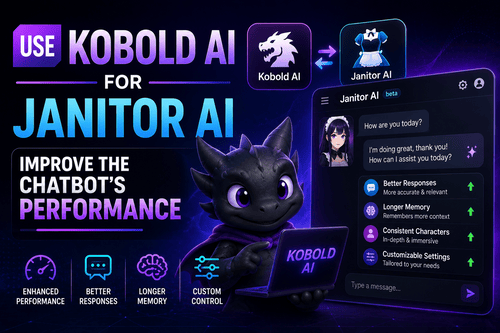
Users can further improve the performance and capabilities of their chatbot using Kobold AI. With a wide range of models and tools, Kobold AI can be a total game-changer for Janitor AI.
Kobold AI is used to train AI chatbots for various purposes. If you are eager to learn to use Kobold AI to enhance Janitor AI’s performance, this post is for you.
Step-By-Step Guide To Use Kobold AI For Janitor AI
Some steps need to be followed to use Kobold AI for Janitor AI. We have detailed the steps in the below lines.
Step 1: Get The Kobold AI Link And OpenAI API Keys
The first thing you need to do is acquire the OpenAI API keys. It is the most important thing needed to use Kobold AI.
You will also need to obtain the Kobold AI link to access the interface and train your chatbot.
Step 2: Access The Settings Page On the Janitor AI Website
Navigate the Janitor AI site and go to the Settings page. This will give you access to the configuration options.
Now you can customize your chatbot and improve its performance.
Step 3: Go To The API Section
On the Janitor AI settings page, find the API option by scrolling down. This is where you can integrate AI functions into your chatbot.
To enable Kolbold AI, select the option, Kobold.
Step 4: Paste The Kobold AI Link
In this step, you will have to paste the Kobold AI link that you obtained in the earlier step.
This link will connect the two AI platforms, allowing for seamless exchange of information and communication.
Step 5: Verify The Kobold API
Now check the Kobold API to make sure that it is valid and working. Select the option Check Kobold URL. This will prompt Janitor AI to check the API.
Once the verification is done, it will connect with Kobold AI.
Step 6: Save The Changes
After completing the above steps, save the changes on the Janitor AI site. This will enable the integration between the two AI platforms.
Now you are all set to use Kabold AI for Janitor AI and train your chatbot.
Resource Allocation With Kobold AI
Many users prefer using Kobold AI for Janitor AI because it supports resource allocation between RAM, GPU, and CPU. This is one of the major advantages offered by Kobold AI.
By allocating resources, you can enhance your chatbot’s performance and train it for specific purposes. For the best results, users should allocate resources wisely. This will help improve the accuracy, responsiveness, and speed of your chatbot. In short, it makes training a chatbot easier.
How To Add API Keys To Janitor AI API?
You can add API keys to Janitor AI API by following these steps.
- First, go to the Janitor AI site.
- Once the site opens, sign up on the site.
- As soon as you log into the site, you will see different characters to chat with.
- Pick a character you like.
- Select the Chat button for the chosen character. You won’t be able to have a conversation with the character unless you have an API key.
- Click on the API Not Ready option.
- Select the Set Up button. You will see a dialog box appear on the screen.
- You will be asked to choose an API key for your chatbot.
- You can configure either Kobold AI or OpenAI.
The steps are easy to follow if you pay attention. To use a Janitor AI chatbot, it is mandatory to have an API key.
How To Configure Kobold AI API Link?
You will need a desktop with a GPU to open and configure Kobold AI. To get the Kobold AI URL, you should follow these steps.
- Navigate to Google Colab Kobold AI GPU and launch the setup.
- Select the Play option to initiate the configuration process.
- Use audio so that you can prevent timeouts.
- Now configure the following things:
Model: Nerys V2 6B
Provider: Cloudflare
Version: United
Use Google Drive: Off
- After this select the Play option to configure Kobold AI.
- It will take several minutes so you need to be patient until it’s done.
- The API URL will show up on the screen after completing the setup.
- The URL is where you can make exciting stories and create images on the page of Kobold AI.
- Now you can configure the Kobold AI link in Janitor AI.
How To Configure OpenAI API Key?
You can configure the OpenAI API key by following these steps.
- Start by selecting OpenAI within the API page.
- Access OpenAI Key from OpenAI. This is needed to activate the chatbot’s function.
- Create an OpenAI account to get the OpenAI API key.
- Access the OpenAI website.
- As the site opens, click on the Sign-Up option.
- Enter the required details and hit the Create Account button.
- Now log into your account.
- Click on your profile picture, located on the upper right edge of the page.
- Choose the option View API keys.
- Select the option Create New Secret Key.
- This will open a new pop-up asking you to enter any text you like. After that select the option Create Secret Key.
- Now copy the key and save it somewhere safe.
- The key is needed to access OpenAI.
- Input the OpenAI key and save the changes.
- Once everything is done, you can start using Janitor AI API.
How To Configure OpenAI Reverse Proxy
These are the steps you need to follow.
- To generate the OpenAI reverse proxy link, you need to first create your OpenAI endpoint, and then include it in the Janitor OpenAI reverse proxy screen.
- Once that is done, select Reverse Proxy within Access OpenAI API.
- Include the secret key that you configured in your .env file when deploying it. Add it in the Reverse Proxy Key.
- Now enter the OpenAI Reverse Proxy link.
- Select the option Check Proxy.
- You will receive a confirmation text upon success.
- Once everything is done, you can proceed to save the changes.
Why Use Kobold AI For Janitor AI?
Integrating Kobold AI with Janitor AI offers various benefits. It helps users to train and improve the performance of their chatbots.
The main benefits of using Kobold AI for Janitor AI are:
-
Better Communication
Janitor AI is backed by Artificial Intelligence that helps facilitate smooth communication using Kobold or OpenAI. Users can further improve the effectiveness and accuracy of their chatbot’s communication by integrating Kobold AI. It will enable the chatbot to engage in a more natural interaction with users.
-
Diversity Of Tools And Models
Kobold AI is known to offer a large selection of tools and models. Each of these is customized to train chatbots for various purposes. From sales to content generation, and customer service, it can train any chatbot. The wide range of models allows users to build efficient chatbots for specific domains. Needless to say, the chatbots deliver high performance.
-
Resource Allocation
When it comes to optimizing a chatbot’s performance, allocating resources between CPU and GPU is a must. Using Kobold AI for Janitor AI allows you to allocate resources as per your needs. This ensures an efficient chatbot that delivers the best performance. It enables the chatbot to provide quick responses and enhance user experience.
About Janitor AI
Janitor AI is a website where you can chat with anime-style character robots. You can either make your character or talk to characters made by others.
What sets Janitor AI apart from other similar AI chatbots is that it allows for NSFW content. It means it goes beyond the usual safety rules. This feature appeals to many users.
Anyone can create characters and earn money by offering chat services on Janitor AI. This helps make the characters more diverse and interesting, but it also raises security concerns due to its NSFW support.
About Kobold AI
Kobold AI is like an open-source tool that lets you make and use your own AI models on your computer.
It’s a lot like ChatGPT because it helps you ask questions and get clear answers. But Kobold AI is all about improving your writing and content skills.
The cool thing is, that Kobold AI isn’t a finished product. You can shape it the way you want to use it. This makes it different from platforms like ChatGPT and Janitor AI.
Conclusion
Janitor AI is one of the best chatbots you can use. By integrating it with Kobold AI, you can improve its performance and make it more efficient. Just follow the steps mentioned in this post and you will be good to go.