

If you’re an IT manager or infrastructure architect right now, VMware is probably giving you a headache. Ever since Broadcom acquired VMware in 2023, licensing costs have gone through the roof, and not just a little.
We’re talking price hikes of up to 500% for some bundles. Perpetual licensing? Gone. Predictability? Out the window.
The good news is you’re not stuck. Plenty of enterprises are already making the move to modern alternatives, and those doing it right are saving serious money while improving performance.
This guide walks you through a solid VMware migration strategy for enterprises, step by step, without the jargon overload.
Why Are Enterprises Leaving VMware?
Honestly? The writing’s been on the wall for a while. But Broadcom’s acquisition accelerated everything. IT teams that used to budget predictably for VMware are now staring at renewal quotes that don’t make sense.
There’s no more perpetual licensing option, support structures have changed, and smaller feature bundles have been folded into expensive mega-packages you might not even need.
Beyond cost, there’s also the issue of vendor lock-in. Modern platforms, especially hyperconverged infrastructure (HCI) solutions, offer lower total cost of ownership, built-in security features, and simplified management.
They’re built for hybrid cloud environments in a way that VMware’s aging architecture simply wasn’t designed to handle natively. So it’s not just about cutting costs. It’s about future-proofing your infrastructure.
That shift is one reason why platforms like Sangfor HCI, which holds a 4.8/5 user rating on Gartner Peer Insights and a 4.7 out of 5 rating on G2, along with being featured as a Representative Vendor in Gartner’s 2025 Market Guide for Server Virtualization, are getting much more serious consideration from enterprises planning their VMware exit and looking for alternatives.
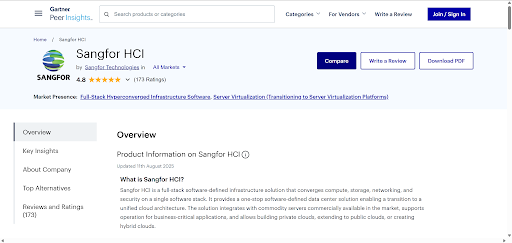
Image Source: Gartner Sangfor HCI Page
Step-by-Step VMware Migration Strategy for Enterprises
So, if you’re ready to future-proof your organization, follow this step-by-step process for migration into a modern HCI platform:
Step 1: Assess Your Current Environment (Don’t Skip This)
Before you touch anything, you need a clear picture of what you’re working with. Use vSphere’s built-in reporting features to inventory every VM, every dependency, and every performance metric. We’ve seen teams rush this step and pay dearly for it later. Compatibility issues mid-migration are not fun.
Key things to map out:
- Which workloads are candidates for lift-and-shift versus those that need re-architecting
- Storage and networking dependencies
- Current licensing agreements and their expiry timelines
- Mission-critical apps that need zero downtime during migration
The goal is to prioritize. Not everything needs to move at once. Start with lower-risk workloads, learn from them, and then tackle the heavy stuff.
Why is a detailed VMware environment assessment critical before migration?
A detailed assessment helps enterprises avoid downtime, compatibility issues, and surprise costs during migration. By inventorying VMs, dependencies, licensing status, and performance baselines upfront, IT teams can identify which workloads are suitable for lift‑and‑shift and which require re‑architecting. This step is essential for planning zero‑downtime migrations to platforms like Sangfor HCI, where prioritization and phased execution significantly reduce risk.
Step 2: Choose the Right Platform
There’s no shortage of vmware alternatives out there. Sangfor HCI, KVM-based HCI, Microsoft Hyper-V, Nutanix, and Proxmox, are all in the conversation. Each has its strengths.
What you should be evaluating: native VMware interoperability, agentless migration tools, subscription-free licensing models, and how well the platform supports your existing networking setup.
One thing Sangfor always tells teams is, “Don’t just chase the cheapest option. Look at the total cost of ownership over three to five years, including support, training, and scaling costs.
Sangfor HCI, for instance, stands out as the best VMware replacement because it integrates compute, storage, and networking into a unified stack (aSV, aSAN, aNet, and aSEC) and offers native vCenter compatibility. That matters a lot when you’re trying to migrate without completely rebuilding your operational playbook.
What should enterprises look for when choosing a VMware replacement platform?
Enterprises should prioritize platforms that offer native VMware interoperability, agentless migration tools, predictable licensing, and integrated compute, storage, and networking. Sangfor HCI stands out because it provides built‑in vCenter compatibility, a unified HCI stack (aSV, aSAN, aNET, aSEC), and transparent pricing, allowing teams to migrate from VMware without retraining staff or rebuilding their operational processes.
Step 3: Prepare Before You Migrate
Set up baselines. Run backups. Create pilot tests on non-critical VMs first. This phase is where a lot of the unglamorous but essential work happens, converting disk formats (VMDK to QCOW2, for example), resolving compatibility issues using OVF exports or API-driven tools, and provisioning your target infrastructure.
Make sure your networking alignment is sorted out before you move anything important. Mismatched VLAN configs have caused more than a few midnight phone calls.
Also, document everything. Your future self (and your team) will thank you.
Step 4: Execute the Migration Smartly
A well-executed VMware migration uses live migration techniques, similar to vMotion, to minimize downtime. You start with powered-on batch transfers, validate as you go, and only shut down source VMs once everything checks out on the destination side.
Sangfor HCI shines here. Its agentless VMware management integrates directly with vCenter and uses VDDK to perform online, powered‑on migrations. Think of it as vMotion‑style live migration, but embedded into the HCI stack: you migrate VMs while they’re running, then power off the source once the cutover is confirmed. No drama.
After each batch, run integrity checks and performance benchmarks. Don’t just assume it worked; verify it.
What Does VMware Actually Cost in 2026?
Broadcom’s updated subscription models have increased costs by up to 500% for some enterprise bundles. There are no perpetual licensing options left. For many mid-size enterprises, annual vmware licensing is now a seven-figure line item. That alone tends to fast-track the conversation about alternatives.
Step 5: Optimize After the Move
Migration isn’t the finish line; it’s the starting point. Once you’re on the new platform, fine-tune resource allocation, enable auto-scaling where it makes sense, and integrate security features like micro-segmentation. Run failover drills. Use built-in analytics to monitor performance and catch any regressions early.
Gradually decommission your VMware environment rather than doing it all at once. Keep it as a fallback until you’re fully confident in the new stack. That confidence usually comes after the first real stress test, a peak traffic event, a planned maintenance window, or a surprise audit.
Our integrated stack makes this phase particularly smooth because compute, storage, and networking are all managed through a single interface. Less context switching, fewer tools, faster troubleshooting.
Is Migrating from VMware Actually Worth It?
A lot of enterprises report up to 70% cost reductions after making the switch to Sangfor HCI. The first few months can be bumpy with compatibility testing, team retraining, and process adjustments.
But the long-term payoff is real. The key is treating migration as a project, not an event. Give it proper resources, define success metrics upfront, and stick to a phased rollout plan.
To put things in perspective, organizations like Malaysia’s Ministry of Communications successfully replaced VMware with Sangfor HCI, citing smooth workload migration, VMware‑like operations, and reduced infrastructure complexity without retraining their IT teams.
Does migrating away from VMware deliver long‑term value for enterprises?
Enterprises that migrate from VMware to modern HCI platforms often report up to 70% reductions in total cost of ownership, along with improved operational simplicity and scalability. While the initial transition requires planning and testing, platforms like Sangfor HCI minimize disruption through live, agentless migration and unified management, making the long‑term cost, performance, and flexibility gains well worth the effort.
Planning Your VMware Exit the Right Way
A clean VMware exit isn’t just about jumping ship. It’s about landing somewhere better. The enterprises doing this well have one thing in common: they’re using the right migration tools that bridge their legacy environment and their target platform without forcing a big-bang cutover.
Sangfor HCI is built for exactly this scenario. It speaks VMware’s language during migration and then gives you a modern, cost-efficient HCI environment on the other side. If you’re evaluating options, it’s worth putting us on the shortlist.
Ready to get started? Sangfor offers free infrastructure assessments to help you scope your migration before you commit to anything. It’s a low-risk way to understand exactly what your move would involve and what you’d save on the other side.